3 min read
BeaconChess vs Chess.com Game Review
First find the moment. Then make the lesson stick.
After a game, two questions matter: where did the position turn, and what should you notice if the same idea appears again? Chess.com Game Review is strong at organizing the finished game. BeaconChess slows down the decision itself so you can compare practical moves and likely replies on the board.
Find the turning points
Game Review organizes accuracy, move classifications, key moments, retries, and coach feedback around the finished game.
Understand the choice
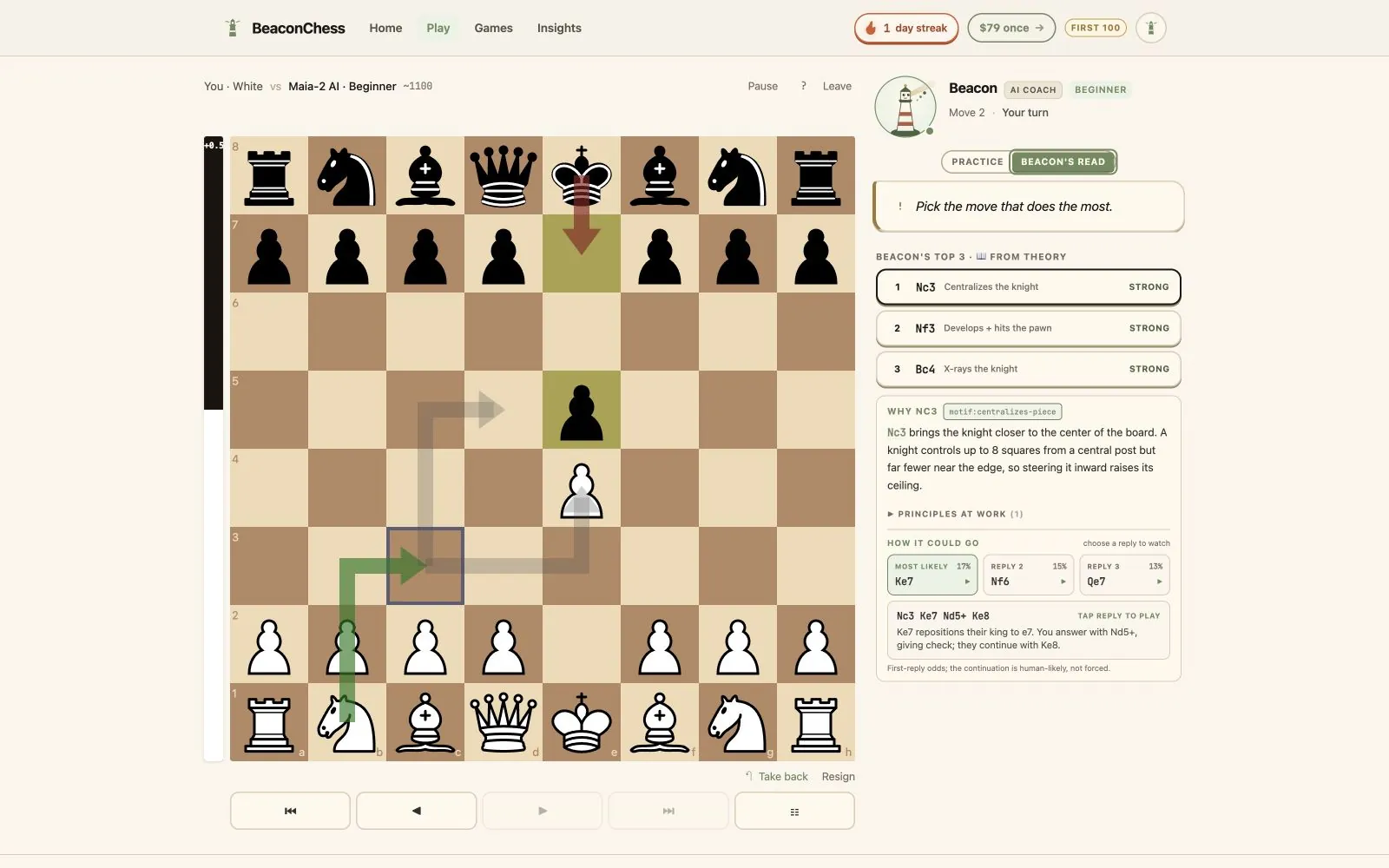
BeaconChess shows up to three plausible moves, explains what each is trying to do, and plays likely continuations on the board.
Rehearse the lesson
Beacon also coaches practice games against Maia-2 opponents labeled from ~1100 to ~2000, so review feeds back into play.
On this page
At a glance
BeaconChess and Game Review at a glance
The products overlap, but their center of gravity is different. This comparison focuses on workflow rather than declaring one universally better.
Primary workflow
BeaconChess
Play a coached game or import a PGN, then explore the important positions.
Chess.com Game Review
Review a finished Chess.com game through accuracy, classifications, and key moments.
Move choices
BeaconChess
Surfaces several candidate moves with a position-specific reason for each.
Chess.com Game Review
Highlights the best move and supports retries and move demonstrations.
Visual lines
BeaconChess
Tap a candidate or reply to animate a likely continuation on the same board.
Chess.com Game Review
Shows engine predictions and tactical ideas from the review controls.
Practice opponents
BeaconChess
Maia-2 opponents conditioned across ten labeled levels from ~1100 to ~2000.
Chess.com Game Review
Part of the broader Chess.com playing and training ecosystem.
Data model
BeaconChess
Games and coaching history stay in the browser; portable export is available.
Chess.com Game Review
Games played on Chess.com naturally remain connected to a Chess.com account.
Payment model
BeaconChess
$79 once during the founder offer, then $99; no subscription.
Chess.com Game Review
Game Review access and limits depend on the current Chess.com membership offering.
| Compare | BeaconChess | Chess.com Game Review |
|---|---|---|
| Primary workflow | Play a coached game or import a PGN, then explore the important positions. | Review a finished Chess.com game through accuracy, classifications, and key moments. |
| Move choices | Surfaces several candidate moves with a position-specific reason for each. | Highlights the best move and supports retries and move demonstrations. |
| Visual lines | Tap a candidate or reply to animate a likely continuation on the same board. | Shows engine predictions and tactical ideas from the review controls. |
| Practice opponents | Maia-2 opponents conditioned across ten labeled levels from ~1100 to ~2000. | Part of the broader Chess.com playing and training ecosystem. |
| Data model | Games and coaching history stay in the browser; portable export is available. | Games played on Chess.com naturally remain connected to a Chess.com account. |
| Payment model | $79 once during the founder offer, then $99; no subscription. | Game Review access and limits depend on the current Chess.com membership offering. |
When Chess.com Game Review is the natural choice
If most of your chess already happens on Chess.com, staying inside one ecosystem removes friction. Game Review can summarize the game, classify moves, surface key moments, and offer retry opportunities without moving a PGN elsewhere.
That speed matters. Sometimes the right review is the one you will actually finish. Game Review also sits beside Chess.com puzzles, lessons, bots, events, and social features, which makes it the natural home base for players who value one connected history.
- You want the whole game summarizedStart with accuracy, classifications, and the moments that changed the evaluation.
- You already play on Chess.comReview immediately without exporting or organizing another copy of the game.
- You prefer one training ecosystemKeep games, puzzles, lessons, and review attached to the same account.
When BeaconChess is the more focused fit
BeaconChess is for the player who looks at “best move” and immediately asks, “Why that move, and what else was realistic?” The answer is attached to the current board: candidate arrows, concrete threats, likely replies, and short explanations tied to the pieces that matter.
That same coaching appears during practice games. If a tactic is missed, Beacon can show the punishment that was available. If the position is stable, the coach can stay quiet instead of grading for the sake of filling space.
- You want alternatives, not one commandCompare plausible moves before committing to a line.
- You learn visuallyUse arrows and playable reply lines to see how the idea develops.
- You prefer local-first storageYour BeaconChess game history is stored on your device, with a portable export from Settings.
A practical way to use both
There is no need to turn this into an either-or decision. Keep playing on the platform you enjoy. Use Game Review to locate the first meaningful turning point, then paste the PGN into BeaconChess when that position deserves a slower, explanation-first pass.
The useful tool is the one that changes what you notice in the next game. A five-minute memory test is more revealing than a feature checklist: close the tools and explain the idea back to yourself without looking.
Common questions
Clear answers before you try it.
Is BeaconChess affiliated with Chess.com?
No. BeaconChess is independent and is not affiliated with, endorsed by, or sponsored by Chess.com.
Can Chess.com games be reviewed in BeaconChess?
Yes. Copy the game as PGN and paste it into BeaconChess. The first three pasted-PGN analyses are free.
Does BeaconChess replace every Chess.com feature?
No. Chess.com is a broad chess platform. BeaconChess is a focused coaching tool for explanations, candidate moves, visual lines, and human-like practice games.
Compare the coaching with one real game.
Play the free coached game or paste a PGN and see which explanation style is easier to remember.