4 min read
Candidate moves in BeaconChess
Stop trying to calculate every legal move.
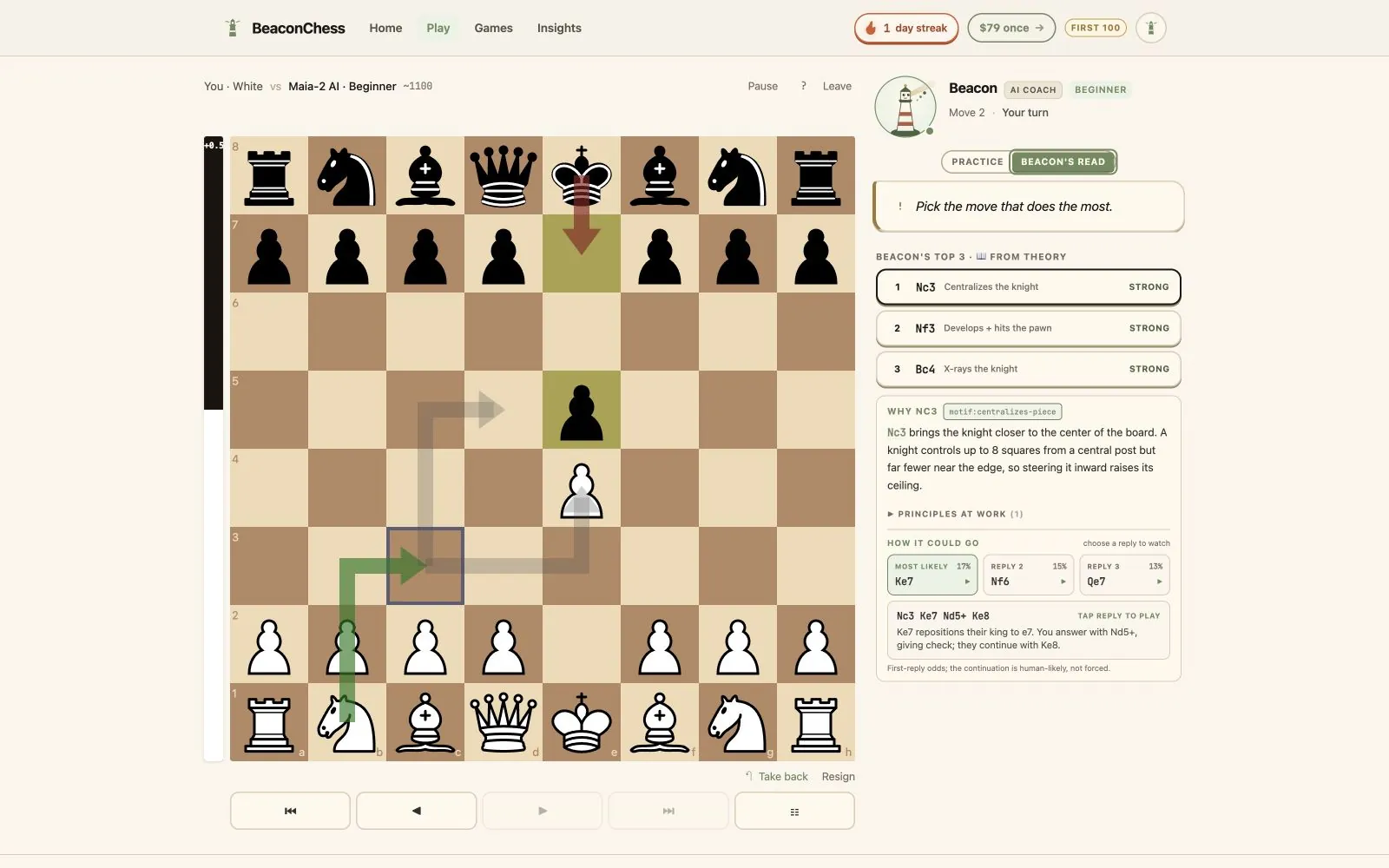
Thinking ahead is not guessing one perfect line. Your opponent can answer in several ways, and you can usually choose from several sensible moves. Candidate-move thinking makes that tree manageable: build a small shortlist, understand the job of each move, then compare the opponent’s likely replies.
Shortlist before calculating
Focus on up to three plausible choices instead of giving every legal move equal attention.
Give every move a job
Connect each candidate to an actual tactic, piece, square, pawn break, defensive task, or positional improvement.
Compare realistic replies
Watch one response, reset the board, and inspect another branch without losing the original decision point.
On this page
What is a candidate move?
A candidate move is a move worth serious consideration before you calculate variations. It is not necessarily the engine’s first choice. It belongs on the shortlist because it is forcing, solves a concrete problem, improves the position, or creates a useful plan.
The shortlist matters because calculation time is limited. If you calculate the wrong moves deeply, you can still miss the idea. Candidate generation decides where to spend attention; calculation checks whether the idea works.
How Beacon chooses what to show
Beacon combines two kinds of signal. Maia-2 supplies a human-policy view: moves that strong humans are realistically likely to consider in the position. Stockfish evaluates the resulting positions so a plausible move is not automatically presented as equally strong.
Chess-specific detectors then look for the reason: a tactical shot, a hanging piece, king safety, a pawn break, a developing move with tempo, a file opening, or another concrete feature. The explanation is attached to the current FEN and line rather than selected from a generic opening slogan.
Why there is more than one continuation
A principal variation is one engine line, not a promise that a human opponent will play it. Beacon’s reply cards show several likely first responses with probability estimates. Later moves represent a likely continuation from each new position, not a forced script.
That distinction is the heart of practical calculation. A move can meet one reply beautifully and struggle against another. Click each line, return to the starting position, and notice which parts of the idea remain true across branches.
- Most likely replyStart with the response a human opponent is most likely to choose.
- Alternative repliesTest other realistic defenses or tactical attempts before deciding the idea is sound.
- Reset and compareReturn to the original position between branches so the visual comparison stays clear.
A routine you can use without Beacon
Before moving, name two or three candidates. Check forcing moves, moves that answer the opponent’s idea, and moves that improve your least useful piece. Give each candidate a one-sentence job, then ask what the opponent would most naturally play.
After the game, compare your candidates with Beacon’s list. The goal is not to copy the list forever. It is to notice why a move deserved consideration and gradually learn to generate that category of move yourself.
What the feature does not claim
The list is not exhaustive, the probabilities are estimates, and automated explanations can be wrong. Candidate arrows are a study aid, not outside assistance for rated games against other people.
Use them in Beacon’s practice environment or during post-game analysis. Turn them off in Settings when you want to test whether the selection habit has become your own.
Common questions
Clear answers before you try it.
How many candidate moves does BeaconChess show?
BeaconChess shows up to three candidate moves for a decision point. Fewer may appear when the position has limited sensible choices or analysis is unavailable.
Are the reply percentages guarantees?
No. They estimate the relative likelihood of the first human reply under the model. They do not mean the line is forced or that a specific opponent will choose it.
Can candidate arrows be used in rated online games?
Do not use engine-assisted candidate arrows in rated games against other people. They are intended for Beacon practice games and post-game study.
Can I hide the arrows?
Yes. Candidate arrows can be disabled in Settings while the post-game candidate explanations remain available.
See candidate thinking on a real board.
Play the free coached game, tap the candidate choices, and compare the likely replies without holding every branch in your head.